 ELXR
ELXRHow to make your bass audible on phone and laptop speakers
Small speakers can't play deep bass, but your brain fills in a low note if it hears that note's harmonics. Add harmonics above the bass (with saturation or a bass enhancer), keep them in tune with the notes, and check the mix the way a phone plays it.
Why your bass disappears on a phone
Phone and laptop speakers are tiny. They can barely play anything below roughly 150–200 Hz, so a sub bass or an 808 is mostly gone. On big speakers the track sounds full; on a phone the bass line vanishes and the beat feels empty.
The fix is a quirk of hearing called the missing fundamental: if you hear the harmonics of a note (its 2nd, 3rd and 4th multiples), your brain hears the low note too, even when it isn't there. Add the right harmonics and the bass comes back on small speakers.
Three ways to do it in Ableton Live
1. Saturation
Saturator or Roar on the bass adds harmonics. It works, but it changes the tone of the whole bass and can get distorted and muddy before small speakers pick it up.
2. A parallel saturated layer
Duplicate the bass, saturate the copy hard, cut its lows with EQ Eight and blend it in quietly. More control, but it's two tracks to manage and easy to overdo.
3. A bass enhancer
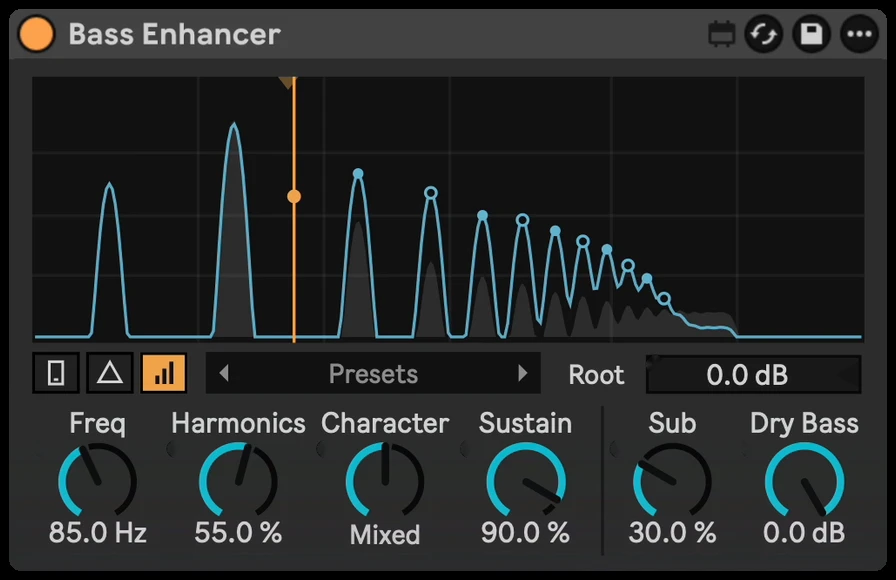
A bass enhancer adds only the harmonics that small speakers can play, and keeps them in tune with each note. Bass Enhancer does this and has a Phone check that lets you hear your track the way a phone plays it.
Step by step with Bass Enhancer
- Drop Bass Enhancer on the bass or 808 track.
- Turn on Phone check to hear the track the way a phone plays it.
- Turn up Harmonics until the bass line comes back.
- Raise Focus if the low mids get crowded, and add Body for extra weight on small speakers.
- Pick a Character, from warm to gritty, and turn Phone check off to check it on big speakers too.
Getting it to sound right
- Check on real small speakers. Bounce a version and play it on your phone. It's the only test that counts.
- Warm harmonics for subs, gritty for 808s. Even harmonics stay smooth; odd ones cut through more.
- Keep the real lows. Bass Enhancer leaves your original bass in the mix, so on big speakers the sub is still there. Use Compare to hear the original at a matched level.
- Use Delta to hear what's added. If the added part alone sounds harsh, back off the amount.