 ELXR
Pitch manual
Written for version d213.
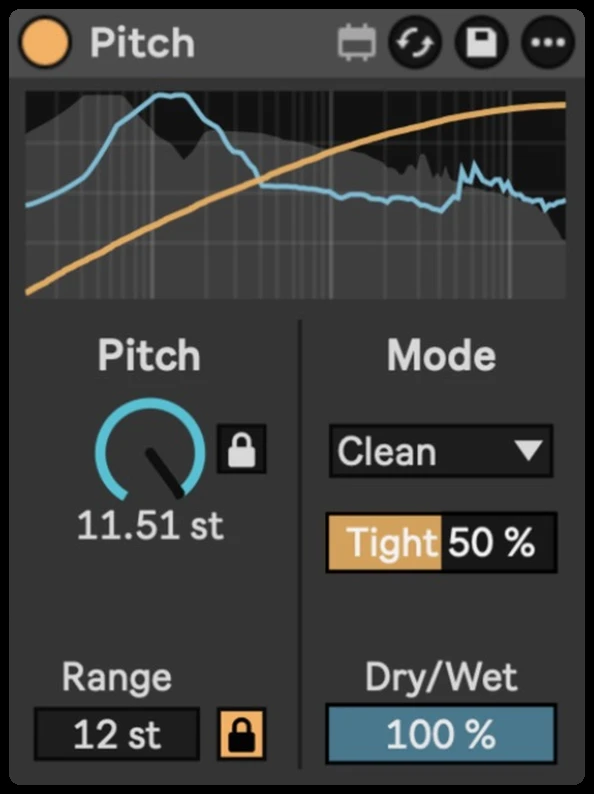
Pitch is a small pitch shifter made for automation. Instead of jumping from semitone to semitone, the Pitch knob moves smoothly across its whole range, so risers, drops, tape-stop style bends and vocal glides sound continuous.
Click Pitch, the current mode setting or Dry/Wet and type a value, then press Enter. Drag the Range box up or down.
Quick start
- Drop Pitch on a track. It starts in Clean mode with Range 24 (two octaves each way).
- Turn or automate Pitch. It glides through every cent; draw a ramp in an automation lane for a riser or a drop.
- Want musical intervals instead? Turn on the Semitone lock next to the knob.
- Pick the Mode that suits the sound: Clean for most things, Vocal or Formant for a single voice, Spectral for pads and chords.
Pitch, Range and the locks
| Control | What it does |
|---|---|
| Pitch | The shift in semitones, up to plus or minus Range. Fully continuous, so automation glides smoothly. |
| Semitone lock | On (orange): Pitch moves in whole semitones. Off: Pitch moves smoothly. |
| Range | How far Pitch reaches each way, 1 to 96 semitones. At 24, Pitch fully right is up two octaves. Drag vertically; hold Shift for slower adjustment. Double-click resets it to 24. The visible Range box does not accept typed values. |
| Range lock | On (orange, the default): Range moves in octave steps from 12 to 96. Off: one semitone at a time, from 1 to 96. Lowering Range also pulls Pitch inside the new limits. |
| Dry/Wet | The balance between the delayed original and the shifted sound. Lower it for parallel pitch layers. At 0 %, the dry path still carries the mode's latency. |
Modes
| Mode | Best for | Its setting |
|---|---|---|
| Clean | Most material: aligned, stereo-linked grains, tight and punchy. | Tight: low is smoother (bass, sustained sounds), high is tighter (drums, fast parts). The small C switch next to it is Chords: off (the default) has the least delay, best for single notes, bass, voices and drums; on keeps chords and full mixes smooth, with more delay. |
| Grain | A textured, classic granular sound. | Grain size, 5 to 200 ms: short keeps transients tight, long is smoother on sustained sounds and big shifts. |
| Spectral | Pads, chords and whole mixes, with detail. | Smooth: from sharp detail to a softer, sustained spectrum. |
| Formant | A simple formant-keeping mode: shifting while keeping one sound's character (its spectral envelope). Works best on a single voice or instrument; soft attacks and consonants can smear. For bass below about 60 Hz, use Clean or Vocal. | Formant: 100 % keeps the voice's character, 0 % lets it shift with the pitch. |
| Vocal | One clean voice per instance, from about 50 Hz: a lead vocal, a single instrument line. Left and right are analysed as one voice, so a stereo recording of one singer works; two different voices split across left and right do not. Put each voice on its own track with its own Pitch. Attacks and consonants can soften a little. | Formant, as above. Beyond about 36 semitones (fully by 48), Vocal blends into band-limited grains so the whole Pitch range still works; formant preservation gives way to continuous pitch at these extreme shifts. |
The box next to the mode shows the setting for the current mode. Smooth affects Spectral only; Formant and Vocal share the Formant setting.
Changing Mode, or toggling Chords in Clean, briefly fades and mutes the output while the processing settles. Choose these before recording or place changes in a gap. In the measured Windows test, mode changes with Smooth switching off left about 0.05–0.11 s gaps, or about 0.25 s when entering Spectral. Automate Pitch for a continuous bend within one mode.
The display
With the default colours, grey shows the input spectrum and blue shows the processed wet spectrum before Dry/Wet and the final peak protection in Formant and Vocal. Turning Dry/Wet down does not turn the blue trace into the final mixed output. Analysis normally uses the stereo mid; if the channels cancel there, it switches toward one channel so the spectrum remains visible. Use Live's output meter to judge the final level.
The yellow line follows your pitch movement. Each movement stretches across the display, with the full height representing Range; it is not a fixed time axis or a pitch detector. It freezes when Pitch reaches the range limit and fades after a hold of about three seconds, or when Pitch returns through zero.
Settings
Smooth switching is off by default. Turn it on to give Clean, Grain, Formant and Vocal a common latency (about 51 ms at 48 kHz), reducing interruptions when changing between them in a delay-compensated Set. Spectral retains its own latency; entering it still pauses briefly (about 0.41 s in the measured Windows test). The option is saved with your Live Set. This setting is separate from the Spectral mode’s Smooth control.
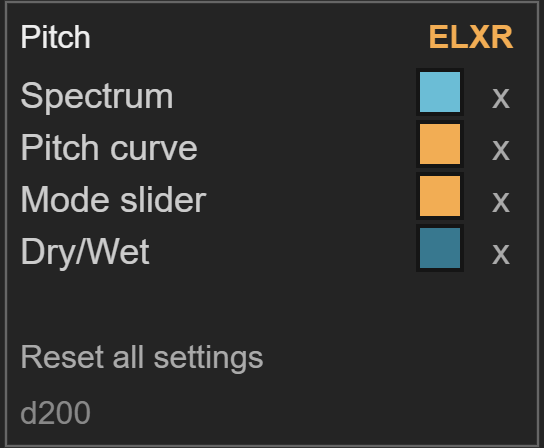
Hover over the display and a small gear appears in its top right corner. Click it to open Settings: the yellow ELXR menu (the website, this manual, a feature request or a bug report) and colours for the spectrum, the pitch curve, the Mode slider and Dry/Wet. Click a colour swatch to open its picker. The x beside a swatch restores that colour; Reset all settings restores all four colours, leaving the sound controls unchanged. Click the gear again to return to the controls. Colours are saved with your Live Set.
Latency
Pitch reports its processing delay to Live for delay compensation. This does not remove the delay you feel while playing through the device. The amount depends on Mode, settings, sample rate and audio buffer. With Smooth switching off (the default), approximate values at 48 kHz are:
| Mode | Processing delay |
|---|---|
| Clean | 13 ms at Tight 50; 29 ms with Chords on. Higher Tight reduces the delay. |
| Grain | About half the grain size: 25 ms at the default 50 ms. |
| Spectral | About 191 ms. |
| Formant | About 48 ms, including peak protection. |
| Vocal | About 51 ms, including peak protection. |
Choose the mode before recording or playing live, and allow it to settle after a change. For precise alignment with other tracks, export at the same sample rate as the audio engine. Exporting at a different rate can leave Pitch misaligned with other tracks; convert the finished render afterwards if you need another rate.
Good to know
- Sound controls, including Mode, can be automated. Sound settings and appearance colours are saved with your Live Set; the colour settings are separate from the sound-control automation.
- Spectral and Formant gradually compensate for level changes while shifting, with correction limited to about 3 dB in either direction. This is not a guarantee of equal perceived loudness or identical peaks. Let the setting settle, compare at a similar listening level and use an output gain device if needed.
- Formant and Vocal include peak protection after Dry/Wet, so even the dry mix can be reduced on loud peaks. Keep headroom when judging the result.
Install
Drop Pitch.amxd on an audio track, or save it into your User Library (Presets / Audio Effects / Max Audio Effect). Needs Ableton Live with Max for Live, on Mac or Windows. Questions: [email protected].