 ELXR
Stereo Shift manual
Written for version s36.1m.
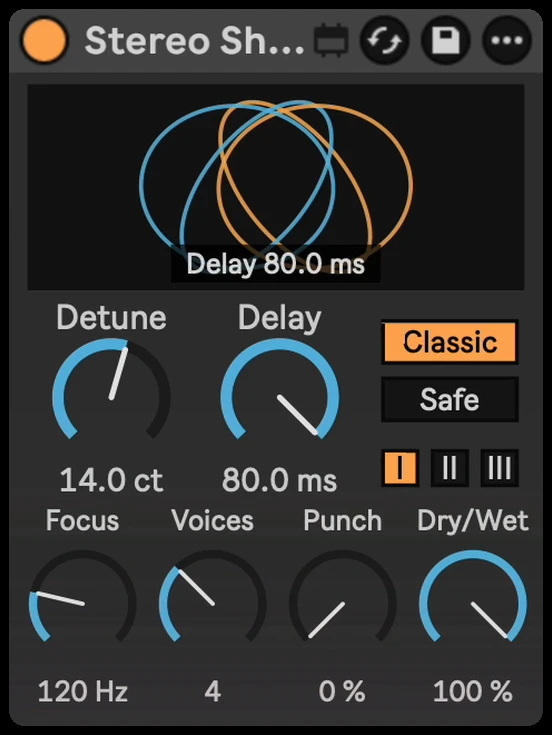
Stereo Shift adds slightly detuned, slightly delayed copies of your sound and spreads them across the stereo field: the classic micro-pitch doubling trick for synths, vocals, guitars and pads. The display shows the copies as moving shapes that open up and turn as you change the knobs.
Click any knob and type a value. Hover Mode or Style for a short label in the display; open Live’s Info View for descriptions of the controls.
Quick start
- Drop Stereo Shift on a synth, vocal, guitar or pad. The default (Classic, Style I, 9 cents, 2 voices) is the classic doubler sound.
- Turn Detune up for more width and shimmer, down for a subtler effect.
- If the track must sound the same in mono (club systems, phones), switch the mode to Safe.
- Use Dry/Wet to blend the effect.
Mode: Classic or Safe
- Classic: the thick, classic doubler sound. At full Dry/Wet, the high-frequency copies replace the original high band, with voices pitched up and down. The transition around Focus is gradual. It can sound slightly phasey when summed to mono.
- Safe: the original signal is kept and the added copies go only into the sides, so the track sounds exactly the same in mono. In Safe, Dry/Wet sets how much width is added.
Controls
| Control | What it does |
|---|---|
| Detune | How far apart the copies are pitched, 0 to 25 cents. More is wider with more shimmer. 9 cents is the classic setting. |
| Delay | How far behind the original the copies sit, 6 to 80 ms. Short is a tight, glued doubling; long is loose, like a second take. |
| Voices | 2 to 8. Two voices is one copy per side (a classic doubler); more voices spread through the stereo field like an ensemble. |
| Focus | Concentrates the widening above this frequency (20 Hz to 10 kHz). Classic uses a gradual crossover, so some sound below Focus still reaches the copies; Safe uses a steeper crossover. Raise Focus to keep more of the low end out of the widening. |
| Style | I Smooth: darker and softer, with the gentle saturation of old digital pitch shifters (default). II Wide: clean, with one side delayed more than the other for extra width. III Bright: open and punchy, with a faint vintage glitch on low notes. |
| Punch | Reduces the widening on hits, keeping more of their dry signal while their tails spread wide. Hits retain the input’s own stereo image; Punch does not centre a stereo input. |
| Dry/Wet | How much of the effect you hear. In Safe, the amount of width added. |
Settings (the gear)
Hover over the display and a small gear appears at its bottom right. Click it to open the Settings card; click it again to close.
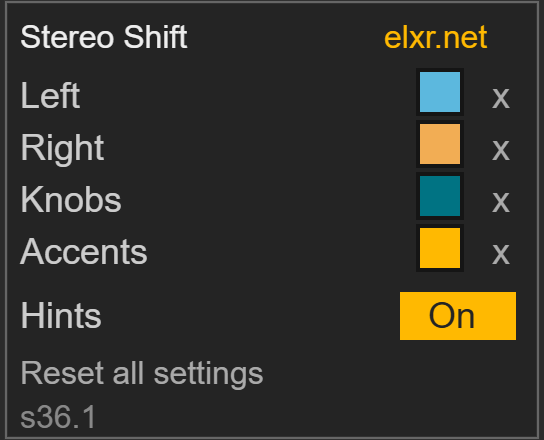
- Left and Right: the colours of the two sides in the display.
- Knobs and Accents: the colour of the knobs and of highlights.
- Click a square to pick a colour; the x next to it goes back to the default.
- Hints: turns the short Mode and Style labels in the display on or off. Knob descriptions remain available in Live’s Info View.
- Reset all settings puts every look setting back.
The yellow elxr.net link at the top of the card opens the ELXR website.
Good to know
- Stereo Shift adds no processing latency. Delay is the timing of the added copies, not a delay applied to the dry path.
- Check mono compatibility by listening: Safe sums back to the original input in mono. It preserves any mono cancellation already present in that input; it does not repair it.
- The eight sound controls are saved with your Live Set and can be automated. Colours and Hints are also saved with the set, but are not automation targets.
- Start with two Voices when using many instances. More voices create a denser ensemble and require more processing. Compare at a similar listening level, since added width can change the stereo level.
Install
Drop Stereo Shift.amxd on an audio track, or save it into your User Library (Presets / Audio Effects / Max Audio Effect). Needs Ableton Live with Max for Live, on Mac or Windows. Questions: [email protected].