ELXR
Best MIDI keyboards for Ableton Live
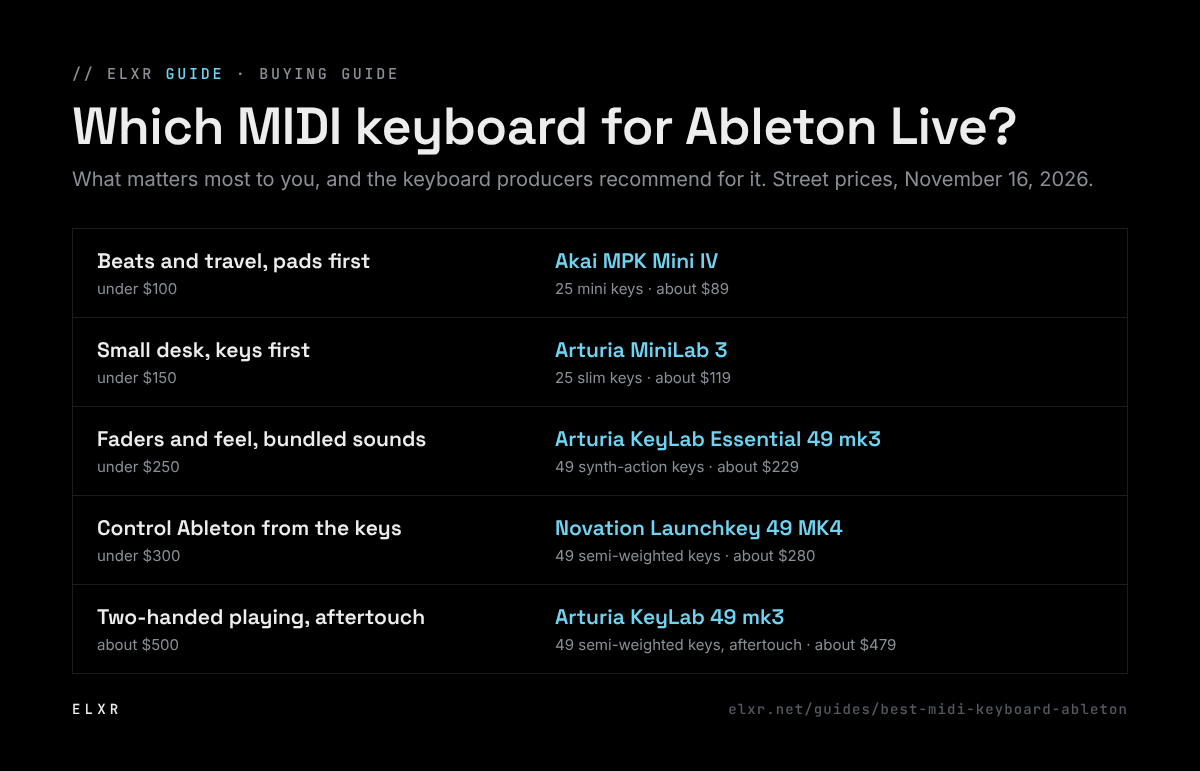
Producers most often recommend the Novation Launchkey 49 MK4 (about $280) for Ableton Live: it controls Session View straight away, and its arp and chord modes are well liked. On a small desk or budget, the Arturia MiniLab 3 (about $119) or the Akai MPK Mini IV (about $89) are the usual picks; for real playing feel, Arturia's KeyLab range.
How this list was made
We didn't test these keyboards. This list sums up what producers and engineers recommend to each other on Reddit, Elektronauts, Gearspace, KVR, the Arturia forum and DJTechTools, checked against reviews in Sound On Sound and elsewhere. The sources are linked at the bottom. Prices are street prices in US dollars on November 16, 2026; they move often, so check before you buy.
Pick yours in ten seconds
Most of the choice comes down to two questions: how many keys you need, and whether you want the keyboard to run Ableton for you or mostly to play notes.
The picks
Novation Launchkey 49 MK4
Why producers pick it: The controller producers recommend most often for Live. It drops straight into Session View: pads launch clips, encoders follow the selected device, and the arpeggiator, chord and scale modes are some of the best-liked on any keyboard. Owners like the semi-weighted keys on the 49 and 61.
The catch: No aftertouch on the keys (only on the pads), the screen is small, some settings sit in menus, and the 49 takes up real desk space.
Arturia KeyLab Essential 49 mk3
Why producers pick it: Arturia keybeds come up again and again as the best in their price range, and the Essential adds nine faders, pads that launch clips in Live, and Analog Lab's sounds in the box. A good pick if you want to play and mix by hand.
The catch: No aftertouch, the arp, chord and scale options are buried in menus, and in Live the encoders follow the first device on a track; reaching the others needs the mouse.
Arturia MiniLab 3
Why producers pick it: The small keyboard people are happiest with: a good keybed for its size, eight pads, eight encoders, four faders and a ready-made Ableton mapping, on a desk the size of a laptop.
The catch: Twenty-five slim keys are too few for two-handed parts, and bend and mod are touch strips rather than wheels, which some players never get used to.
Akai MPK Mini IV
Why producers pick it: The long-time favorite for beatmakers and travel. The fourth version adds real pitch and mod wheels, a color screen and a full-size MIDI out, and the MPC-style pads are the reason people buy it.
The catch: Mini keys are hard going for trained players, there are no faders, and the build is plastic. Setup (registration and software installs) is the most common beginner complaint.
Arturia KeyLab 49 mk3
Why producers pick it: When the question is “which one feels like an instrument?”, this is the usual answer below the premium tier: quiet, semi-weighted keys with aftertouch, solid build, and a slim body for its size.
The catch: It costs about twice the Essential, the aftertouch is channel (not per-key), and it has fewer pads than the mk2 it replaced.
25, 37, 49 or 61 keys?
- 25 keys: basslines, leads, drums and one-handed chords. Forum advice is consistent that 25 keys get frustrating once you want to use both hands.
- 37 keys: the compromise. Room for a left-hand chord and a right-hand melody on a small desk.
- 49 keys: the most common recommendation for a first real keyboard. Enough for two hands, still fits in front of a laptop.
- 61 keys and up: if you play piano parts or already play keys. The extra width matters more than the extra controls.
What actually matters for Ableton
- Integration over knob count. A keyboard Live recognizes on its own (Launchkey, KeyLab, MiniLab, MPK Mini all do) maps its pads to clips and its encoders to devices without setup (how far that goes varies; see each pick's catch). That saves more time than extra knobs.
- The keybed. The most common regret in the threads is a keybed that felt wrong. Mini keys are fine for drums and bass and awkward for chords; synth action is light and fast; semi-weighted feels closer to a piano.
- Aftertouch. Pressing harder into a held key to open a filter or add vibrato. Nice for expressive sounds, and only the KeyLab mk3 on this list has it on the keys.
- Arp, chords and scales on the keyboard. Useful if you like playing ideas in rather than drawing them; Live's own Arpeggiator, Chord and Scale devices do the same in software.
Setting it up in Live
- Plug it in by USB and open Live's Settings, then Link, Tempo & MIDI.
- Under Control Surface, pick your keyboard if it isn't chosen already (many are picked automatically). Set its Input and Output to the keyboard.
- In the MIDI Ports list, switch on Track for the keyboard's input so it can play instruments, and Remote if you want to map extra controls yourself.
- Arm a MIDI track with an instrument and play. If nothing sounds, check the track's input is set to All Ins or the keyboard.
Sources
- Reddit, summarized: the most-recommended MIDI controllers
- Reddit, summarized: controllers for Ableton
- Elektronauts: Novation Launchkey MK4 owners' thread
- Gearspace: Launchkey 49 MK4 user review
- Arturia forum: first MIDI controller advice
- KVR: Arturia KeyLab mk3 review
- KVR forum: MiniLab 3 thread
- DJTechTools forum: best MIDI keyboard for Ableton
- Sound On Sound: Novation Launchkey MK4 review
- Sound On Sound: Arturia KeyLab Essential mk3 review
- SoundGuys: Akai MPK Mini IV review
Last checked November 16, 2026. Forum opinions summarized in our own words.